UAT checklist
Here general principles for running a user acceptance tests
5/25/20242 min read
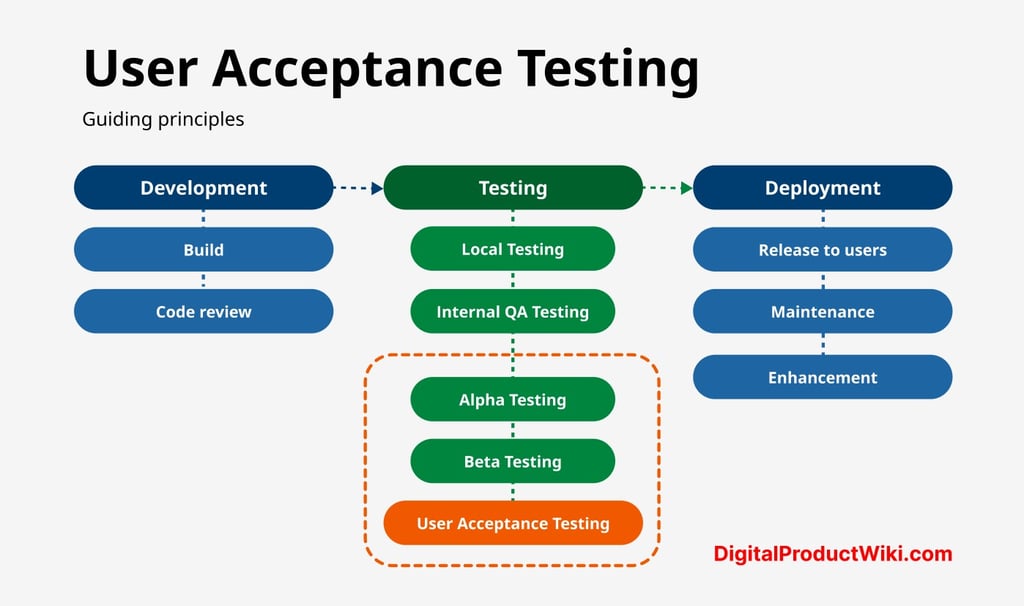
Challenges of UAT
When conducting UAT, companies can run into the following challenges:
Poor UAT documentation. Lack of scope, defined objectives, and test plan will cause issues during testing—getting your entire team (and testers) aligned is crucial for success with UAT.
Not enough extensive internal QA. Development teams can save themselves a lot of admin time by getting rid of several bugs upstream, rather than leaving it for the UAT phase. Ideally, UAT testers should operate in a nearly bug-free environment.
Lack of a strong testing team. Pre-screen your testers and ensure they are the right target audience for your software. Train them in the different tools and processes you use for testing, and align them with your goals.
Not using the right tools. For large-scale projects in particular, asking your testers to use Excel, Google Docs, or emails for their reports is a recipe for disaster. Prepare solid bug tracking and reporting solutions to make it easier for everyone involved.
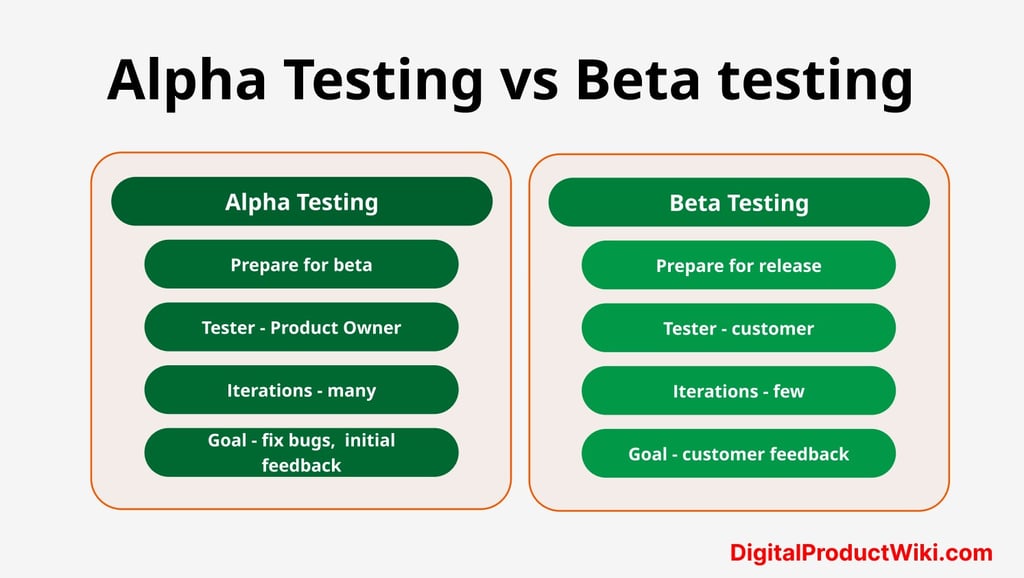
User acceptance testing (UAT) best practices and checklist
This checklist is a recap of everything we’ve discussed in this post, and contains all best practices for user acceptance testing.
Design project scope and objectives. Have a clear plan for the new feature or software that you are releasing. During UAT, come back to this document to ensure pain points have been properly addressed.
Design workflows. Workflows allow you to align everyone. Share workflows with the testing team so they can accurately pinpoint where issues occurred and give you feedback on the fly.
Prepare staging environmment. Run tests in a safe environment. Staging is a perfect copy of your production, the ideal playground for alpha and beta testers.
Pre-organize feedback. Pre-categorize into two categories: instant action and discussion.
Brief testers. In alpha testing, tell testers about the new feature you’ve built in detail. Make it clear what the business objective is, and what you expect to discover from this testing.
Draft test cases. For large-scale and beta testing, draft test cases for all users to follow and report on. Mention at least case test steps & expected results.
Deploy a bug reporting system. Use a powerful bug reporting tool like Marker.io to assist your dev team. Added benefit: greater accuracy from reporters, and makes the dev life that much easier.
Document all steps. Keep tabs on what was fixed, what needs working on, expected challenges in the next iteration, etc.
Great UAT starts with great organization.